Today we broke the news about the release of iOS 4.2.1 GM for iPhone 4, 3GS, 3G, iPod touch 4G, 3G and iPad. Now you can use Redsn0w 0.9.6b2 to jailbreak all these iOS devices. Moreover I have collected the direct download links for iOS 4.2.1 GM to all above mentioned devices.
You have to note that Cydia doesn't work till now due to some issues on the private APIs used by Cyida which has been changed by Apple. Bud don't worry the developers has fixed these issues and it is only a matter of time as they are waiting for the iOS 4.2.1 public release. For now you can install jailbroken-apps via SSH - until we got the new Cydia version - as you have full root access on your iOS device.
Showing posts with label iPod. Show all posts
Showing posts with label iPod. Show all posts
Friday, November 19, 2010

Thursday, November 18, 2010
iOS 4.2 Likely to be Released Today?
Apple's iOS 4.2 software update for iPad, iPhone and iPod touch could be rolling out today, according to a 9to5Mac tweet.
HootSuite is Now Available for iPad
HootSuite for iPad is here! the online service to manage multiple social networks in one single place landed on the iPad with it's first app on the app store. HootSuite was already available for iPhone but it now comes to the iPad bringing all features, options and functionalities iPhone users have been able to enjoy for a year.
Monday, November 15, 2010
Facebook for iPhone 3.3.2 Brings Account & Privacy Settings
Facebook for iPhone app has been updated fixing several major bugs in the previous version. Moreover it adds the ability to control your account and privacy settings directly from the Facebook app instead of having to leave the app and logging on via the web browser.

Download Facebook for iPhone and iPod touch [iTunes Link]

What's New in Version 3.3.2After installing the new version, when you tap the Account button, it brings up a menu which shows you account and privacy settings along with the logout option. There's no changes in the new version suggesting the upcoming Facebook mail which should happen today. You can update the app via iTunes or download it directly from the link below.
- Access account settings, privacy settings and Help Center
- Fixed a bug that prevented users from uploading photos to specific albums
Download Facebook for iPhone and iPod touch [iTunes Link]
Sunday, November 14, 2010
iREB 4.1, iTunes Restore Errors Bypasser, is Out to Support all Devices
iREB is a must have tool for iOS users works under Windows machines which lets you put your device into a pwned state so that you will be able to upload custom firmware to it. iH8sn0w has just released iREB 4.1, the iTunes restore error bypasser to support all new & old devices.
 Supported Devices:
Just download iREB from the link at the end of the page, and follow our guide posted here to cook your custom firmware with Sn0wbreeze for Windows and follow our guide posted here to do the same with PwnageTool for Mac. Then use iREB to put your device into DFU mode and install your cooked firmware (you'll not get iTunes errors with iREB). Also keep in mind that iREB only works on iTunes 10 or above.
Download iREB 4.1
Download iTunes 10.1
- iPhone 2G
- iPhone 3G
- iPhone 3G[S] (old & new bootrom)
- iPhone 4
- iPod Touch 1G
- iPod Touch 2G (MB & MC)
- iPod Touch 3G
- iPod Touch 4
- iPad
- Apple TV 2
Just download iREB from the link at the end of the page, and follow our guide posted here to cook your custom firmware with Sn0wbreeze for Windows and follow our guide posted here to do the same with PwnageTool for Mac. Then use iREB to put your device into DFU mode and install your cooked firmware (you'll not get iTunes errors with iREB). Also keep in mind that iREB only works on iTunes 10 or above.
Download iREB 4.1
Download iTunes 10.1
Android Coming to iPod touch 4G [CONFIRMED]
Remember when we talked about OpeniBoot on iPhone 4 and iPad? Well, it seems like the same hacker Hexxeh has confirmed that they tested the required binaries on a iPod touch 4G and it works fine. Promising !

lots of people asking whether OpeniBoot will work on iPT4. We tested an i4 binary earlier, worked fine, which is promising. No ETAs.As you read, there's no ETA yet but at least it's a confirm that OpeniBoot will work on iPod touch 4G too. Stay tuned as we'll keep you updated whenever the new version of OpeniBoot is out.
Saturday, November 13, 2010
HOW TO: Jailbreak iOS 4.1 with Sn0wbreeze 2.1
Sn0wbreeze 2.1 was out this morning to jailbreak iOS 4.1 on all devices. The new version of Sn0wbreeze is based Limera1n's exploit but with this one, you can preserve your device's baseband by creating custom firmwares and upgrade your device using it to keep your carrier unlock.
Supported Devices:
Before we start the steps, make sure your computer is running Windows 7, Vista or XP and your iOS device is running older firmware not iOS 4.1.
STEP 1: Download iTunes 10.1 (or iTunes 10) from the links at the bottom of post.
STEP 2: Now start iTunes and sync your iPhone with your PC so that it backs-up all your important data including settings, apps, music, contacts and photos.
STEP 3: Download Sn0wbreeze 2.1 (links at the bottom of post) and move all these files on the desktop.
STEP 4: Launch Sn0wbreeze (please note that when used windows 7 or vista, you need to start your application in administrator mode, by clicking the right mouse button on the icon and selecting "Run as administrator") then select Expert Mode and click on the blue arrow.

STEP 5: Now, point Sn0wbreeze to the original firmware (downloads at the bottom) by clicking on Browse and select it as below:


STEP 6: Once your device is recognized, hit the blue arrow.

STEP 7: Click on General, and check on Activate the iPhone [Hacktivate] if you are on unofficial carrier and want to hacktivate your phone by Sn0wbreeze.

Other items are optional, depends on your choices. You can't install Ultrasn0w automatically due to some problems between the developer of Sn0wbreeze and the iPhone Dev Team.
STEP 8: At the end, hit Build IPSW to start creating your firmware.

STEP 9: Once you finished, you have to put your device in DFU mode. Sn0wbreeze will help you with that.

STEP 10: Now iTunes will detect will detect your device in recovery mode. To install the new firmware, you have to restore using the cooked firmware by clicking on the iPhone icon on the left sidebar of iTunes then hold left “alt” button (“shift” button on Windows) on the keyboard and then click on “Restore” then release the alt button, now select the custom firmware created by Sn0wbreeze and let iTunes go in a bunch of steps.
STEP 11: Well done, now you can unlock your iPhone 4, iPhone 3GS, iPhone 3G using the latest version of Ultrasn0w by following the step by step guide posted here.
In case you got any problems with the guide, we would like to hear from you by commenting in the comment section below. [via iPhoneItalia]
Download iOS 4.1 for iPhone and iPod touch
Download iOS 3.2.2 for iPad
Download iTunes 10.1
Download Sn0wbreeze 2.1
Download .NET Framework 3.5 (required to run Sn0wbreeze)
Supported Devices:
- iPhone 4, iPhone 3GS, iPhone 3G
- iPod touch 4G / 3G / 2G
- iPad WiFi and 3G
- Apple TV 2G
Before we start the steps, make sure your computer is running Windows 7, Vista or XP and your iOS device is running older firmware not iOS 4.1.
STEP 1: Download iTunes 10.1 (or iTunes 10) from the links at the bottom of post.
STEP 2: Now start iTunes and sync your iPhone with your PC so that it backs-up all your important data including settings, apps, music, contacts and photos.
STEP 3: Download Sn0wbreeze 2.1 (links at the bottom of post) and move all these files on the desktop.
STEP 4: Launch Sn0wbreeze (please note that when used windows 7 or vista, you need to start your application in administrator mode, by clicking the right mouse button on the icon and selecting "Run as administrator") then select Expert Mode and click on the blue arrow.

STEP 5: Now, point Sn0wbreeze to the original firmware (downloads at the bottom) by clicking on Browse and select it as below:

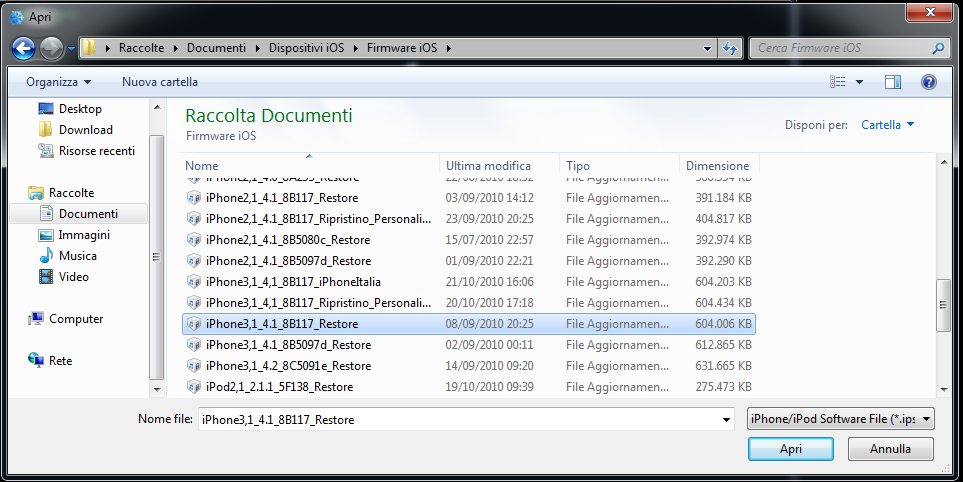
STEP 6: Once your device is recognized, hit the blue arrow.

STEP 7: Click on General, and check on Activate the iPhone [Hacktivate] if you are on unofficial carrier and want to hacktivate your phone by Sn0wbreeze.

Other items are optional, depends on your choices. You can't install Ultrasn0w automatically due to some problems between the developer of Sn0wbreeze and the iPhone Dev Team.
STEP 8: At the end, hit Build IPSW to start creating your firmware.

STEP 9: Once you finished, you have to put your device in DFU mode. Sn0wbreeze will help you with that.

STEP 10: Now iTunes will detect will detect your device in recovery mode. To install the new firmware, you have to restore using the cooked firmware by clicking on the iPhone icon on the left sidebar of iTunes then hold left “alt” button (“shift” button on Windows) on the keyboard and then click on “Restore” then release the alt button, now select the custom firmware created by Sn0wbreeze and let iTunes go in a bunch of steps.
STEP 11: Well done, now you can unlock your iPhone 4, iPhone 3GS, iPhone 3G using the latest version of Ultrasn0w by following the step by step guide posted here.
In case you got any problems with the guide, we would like to hear from you by commenting in the comment section below. [via iPhoneItalia]
Download iOS 4.1 for iPhone and iPod touch
Download iOS 3.2.2 for iPad
Download iTunes 10.1
Download Sn0wbreeze 2.1
Download .NET Framework 3.5 (required to run Sn0wbreeze)
Friday, November 12, 2010
Download Sn0wbreeze 2.1 to Jailbreak iOS 4.1 / 3.2.2 on iPhone 4 / 3GS , iPod Touch 4G / 3G and iPad
Sn0wbreeze 2.1 has been released few moments ago, this tool also know as PwnageTool for Windows, this version will jailbreak iOS 4.1 on iPhone 4G, iPhone 3GS / 3G, iPod touch 4G / 3G and iOS 3.2.2 on iPad.
 Supported Devices:
As usual we will prepare the full guide to jailbreak iOS 4.1 on all supported devices very soon, keep your eyes opened.
Download Sn0wbreeze 2.1 for Windows

- iPhone 3G/3G[S]/4
- iPod Touch 2G/3G/4
- iPad
- Apple TV 2
As usual we will prepare the full guide to jailbreak iOS 4.1 on all supported devices very soon, keep your eyes opened.
Download Sn0wbreeze 2.1 for Windows
iOS 4.2 Public Launch on November 24th?
Here we go, let the rumors start again about iOS 4.2 public release. A new rumor claims that iOS 4.2 update is set to launch on November 24th, the day before Thanksgiving in the U.S.


The iOS 4.2 software update had been expected today, but Apple has delayed it release until Nov 24, a reliable source has told the Telegraph.iOS 4.2 was set to launch today but has been delayed owing to Wi-Fi issues on iPad so Apple today has pushed a new GM seed for iPad only to address this issue. Anyway, we'll keep you updated whenever iOS 4.2 is available. [via MacRumors]
Apple has refused to comment on the speculation, stating only that it had said the software update would be released in November.
But a source that works closely with Apple said that the company had shelved its original plan to release the software update today, and had instead pushed back the launch until later this month.
Thursday, November 11, 2010
Cydia is Now Ready to Work on iOS 4.2
As noted by Redmond Pie, one of Twitter users has asked the popular iPhone developer Chpwn about the progress in the new Cydia. He has confirmed that Cydia is now ready for use on jailbroken iOS 4.2 devices.

EsMaNdAu: @chpwn how’s Cydia for iOS 4.2 Going….! #Thanks "For Just Reading Me"As you know, iOS 4.2 public release seems very near (may be Friday?), Cydia is now ready on iOS 4.2, and also iOS 4.2 is already jailbroken with the latest Redsn0w. So, we won't wait a lot for the untethered jailbreak & unlock on iOS 4.2.
Chpwn: In ready position.
Tuesday, November 9, 2010
iOS 4.2 Expected Release Time
As usual Covering Web used to speculate around the release time for new iOSs, and here we prepare this article to expect the release time of iOS 4.2. In fact I can't confirm specific time but we can follow the same stories in the previous iOS versions, specially our speculations around iOS 4.1 came very accurate.
 Couple of days we have showed you reports that it could be 9th November (today) or 12 November. Fifty percent it will be today, about the timing we can say that the previous scenarios were like this, iOS 4.1, iOS 4 and iOS 3 were released approximately between 10:00 am and 10:30 am PT.
You can follow this link to check the time zone for your country, it's a time table for all countries refers to 10:00 AM Pacific Time. After checking your time, you should have a look about our full coverage on iOS 4.2 features on this post.
Any way you have check Covering Web from time to time as the release time became very imminent. Stay Tuned.

You can follow this link to check the time zone for your country, it's a time table for all countries refers to 10:00 AM Pacific Time. After checking your time, you should have a look about our full coverage on iOS 4.2 features on this post.
Any way you have check Covering Web from time to time as the release time became very imminent. Stay Tuned.
Sunday, November 7, 2010
iOS 4.2 Release Date is Getting Closer !
Our BFFs over 9to5mac are reporting that iOS 4.2 will go public for iPhone, iPad and iPod touch sometime between 9 and 12 this month. The information has been received from two German sites.
The first site, Inside-Handy.de claims that iOS 4.2 will go public on Tuesday November 9th. THey got this reports from a representative working at Deutsche Telekom.
The other one name iFun, they have discovered that Apple will be pushing out some carrier updates on November 12th. Based on this, they figure there is a chance iOS 4.2 may be released the same day.

Anyway, stay tuned as we'll inform you whenever iOS 4.2 is available for public sometime this week. While waiting for iOS 4.2, you can take a look at our previous post here for quick features guide on iOS 4.2.
The first site, Inside-Handy.de claims that iOS 4.2 will go public on Tuesday November 9th. THey got this reports from a representative working at Deutsche Telekom.
The other one name iFun, they have discovered that Apple will be pushing out some carrier updates on November 12th. Based on this, they figure there is a chance iOS 4.2 may be released the same day.
Anyway, stay tuned as we'll inform you whenever iOS 4.2 is available for public sometime this week. While waiting for iOS 4.2, you can take a look at our previous post here for quick features guide on iOS 4.2.
GreenPois0n Source Code is Now Available for Download
Couple of days back, Chornic Dev Team promised that the source code of GreenPois0n jailbreak tool will be available for download. They have done what they have promised. The source code of GreenPois0n iOS 4.1 jailbreak tool is now available for download so you can use it to modify the tool and make it much better to help the jailbreak community.
 GreenPois0n jailbreak tool was released last month based on Limera1n's exploit and you can use it to jailbreak iPhone 4, iPhone 3GS, iPad, iPod touch 4G, 3G, 2G on iOS 4.1. You can take a look at our guide posted here to jailbreak iOS devices with GreenPois0n. Moreover, iPhone Dev Team promised with the source code of Redsn0w, so stay tuned and we'll inform you whenever it's available.
Download GreenPois0n Source Code [GitHub]
Download GreenPois0n Source Code [GitHub]
Saturday, November 6, 2010
iOS 4.2 Walkthrough
We're about to see iOS 4.2 for iPhone, iPad and iPod touch. In this post we made a quick feature guide to Apple’s iOS 4.2 update especially for iPad. iOS 4.2 is a major update and for first time, iPhone, iPad and iPod touch will get the same version.
iOS 4.2 was announced in Apple's 2010 special musical event, Apple started rolling out iOS 4.2 betas starting from September 15th then followed by beta 2 and beta 3 and now we're testing the final gold master version. To sum up the new features, it brings Multitasking, folders, and unified inbox from iOS 4, also Game Center and TV show rentals from iOS 4.1, and adds in AirPlay video sharing and AirPrint wireless printing. Let's take a deep look at this features.
Hardware changes:
Apple has added a software orientation lock similar to that of the iPhone/iPod touch to iOS 4.2 to the iPad. This means that the orientation lock switch on the side of the iPad is now a mute switch, just like the iPhone. The only real difference between the iPad’s orientation lock widget and the iPhone’s is that it locks in both in landscape and portrait mode. But to be clear infront of you, there was an e-mail sent from Jobs to a reader over 9to5mac confirming that there's no hardware changes, we don't know what will happen in the public release.
AirPlay:
AirPlay is essentially an upgrade of apple’s AirTunes system, which used to let you stream music between iTunes on windows/Mac and Apple TV or Airport Express connected speakers. AirPlay steps it up and lets you steam media [video, pictures and music] from the iPhone, iPod touch, iPad and the 2010 Apple TV. It looks any app store app can stream as well as the built-in apps like iPod, video and photo if they so choose to do so.

AirPrint:
AirPrint is another evolution of Apple's wireless printing service. You will be able to send pages to almost any printer on the same Wi-Fi network, or to certain printers directly.

HomeScreen:
iPad has finally got iOS 4's HomeScreen with multitasking, folders and this wow background; Moreover, it got some new changes. In the upper right corner next to the battery percentage indicator there is not a small arrow pointing northeast, this icon indicates a location-based service is running, such as Wi-Fi mapping, or GPS; this feature is imported from iOS 4.
Multitasking:
That's the most important and big feature in iOS 4.2 for iPad, the arrival of real Multitasking to the iPad and guess what, it's different from iPhone's one. It's based on having your current screen slide to left, while the new one will slide around it horizontally to get on the front. Here's a video to see it in action:
AVRCP Audio / Video Remote Control:
Yes, you read it right, you can finally control, skip tracks, and everything you can ever dream with! Volume changes on the headset don’t show up on the iPhone’s volume slider, however, they do work in both iTunes store streaming and iPod apps.
Passcode Lock:
iOS 4.2 brings passcodes to the iPad. You can turn it on from the Settings app on your HomeScreen and yes it's a Vader-black keyboard

Game Center:
iOS 4.2 makes Game Center possible on iPad which is already possible on iPhone and iPod touch running iOS 4.1. We already have seen some games being approved supporting iOS 4.2 for iPad.
Safari:
Yes, there's a bit difference in the web browser. iOS 4.2 gives the ability to search for a word in a web page, you can use the search field to type what you are looking for and find it. Besides, the previous + icon, for adding bookmarks and Web Clips is gone, replaced by the Action button found in other apps. Hitting the action button gives you all the same options as before, but now also includes AirPrint.
Mail:
iPad got a unified inbox just like iPhone has had since iOS 4.0. Unlike iPhone, the column view on the left of iPad lets you see your inbox choices on the left in landscape mode and in popover in portrait so it can be even faster to move around.
Youtube:
Youtube has got a major features in this iOS. You could give a YouTube video the old thumbs up or thumbs down right on your iPad. And yes, AirPlay is back to Youtube since it was removed in beta 3 but it's now there in the gold master release.
Notes:
You can -- finally -- change fonts in Notes. You can now jump into Settings and switch it to Chalkboard, and Helvetica, used by the rest of the interface.

Restrictions:
This one is good for parents as it gives parents as much control as they possibly can with iOS 4.2. You can now easily restrict almost any feature of iOS, whether it’s deactivating location or messing with the account settings.

Jailbreak & Unlock:
This is not a feature, but I wanted to clear out what's going on with iOS 4.2 jailbreak. Currently, iOS 4.2 is jailbroken but unluckily Cydia is broken on iOS 4.2 and we've got some screenshots for the new Cydia. Once iOS 4.2 is released, Cydia will be updated and you will be able to jailbreak your device with one of the tools on the web.
For the unlock, Ultrasn0w should be updated two days at most after iOS 4.2 release to unlock baseband 05.14.02. Baseband 02.10.04 should take a bit longer. Anyway, we'll inform you as soon as possible.
Before you leave:
I'm done! We almost covered most of the important features found in the beta releases of iOS 4.2 but in case you know other new features, you can leave us a comment below. iOS 4.2 should be available sometime this week or next week, stay tuned for that too.
[Thanks for guys over TiPb, MacStories, AppAdvice, 9to5mac for carrying out lots of things]
iOS 4.2 was announced in Apple's 2010 special musical event, Apple started rolling out iOS 4.2 betas starting from September 15th then followed by beta 2 and beta 3 and now we're testing the final gold master version. To sum up the new features, it brings Multitasking, folders, and unified inbox from iOS 4, also Game Center and TV show rentals from iOS 4.1, and adds in AirPlay video sharing and AirPrint wireless printing. Let's take a deep look at this features.
Hardware changes:
Apple has added a software orientation lock similar to that of the iPhone/iPod touch to iOS 4.2 to the iPad. This means that the orientation lock switch on the side of the iPad is now a mute switch, just like the iPhone. The only real difference between the iPad’s orientation lock widget and the iPhone’s is that it locks in both in landscape and portrait mode. But to be clear infront of you, there was an e-mail sent from Jobs to a reader over 9to5mac confirming that there's no hardware changes, we don't know what will happen in the public release.
AirPlay:
AirPlay is essentially an upgrade of apple’s AirTunes system, which used to let you stream music between iTunes on windows/Mac and Apple TV or Airport Express connected speakers. AirPlay steps it up and lets you steam media [video, pictures and music] from the iPhone, iPod touch, iPad and the 2010 Apple TV. It looks any app store app can stream as well as the built-in apps like iPod, video and photo if they so choose to do so.

AirPrint:
AirPrint is another evolution of Apple's wireless printing service. You will be able to send pages to almost any printer on the same Wi-Fi network, or to certain printers directly.
HomeScreen:
iPad has finally got iOS 4's HomeScreen with multitasking, folders and this wow background; Moreover, it got some new changes. In the upper right corner next to the battery percentage indicator there is not a small arrow pointing northeast, this icon indicates a location-based service is running, such as Wi-Fi mapping, or GPS; this feature is imported from iOS 4.
Multitasking:
That's the most important and big feature in iOS 4.2 for iPad, the arrival of real Multitasking to the iPad and guess what, it's different from iPhone's one. It's based on having your current screen slide to left, while the new one will slide around it horizontally to get on the front. Here's a video to see it in action:
AVRCP Audio / Video Remote Control:
Yes, you read it right, you can finally control, skip tracks, and everything you can ever dream with! Volume changes on the headset don’t show up on the iPhone’s volume slider, however, they do work in both iTunes store streaming and iPod apps.
Passcode Lock:
iOS 4.2 brings passcodes to the iPad. You can turn it on from the Settings app on your HomeScreen and yes it's a Vader-black keyboard

Game Center:
iOS 4.2 makes Game Center possible on iPad which is already possible on iPhone and iPod touch running iOS 4.1. We already have seen some games being approved supporting iOS 4.2 for iPad.
Safari:
Yes, there's a bit difference in the web browser. iOS 4.2 gives the ability to search for a word in a web page, you can use the search field to type what you are looking for and find it. Besides, the previous + icon, for adding bookmarks and Web Clips is gone, replaced by the Action button found in other apps. Hitting the action button gives you all the same options as before, but now also includes AirPrint.
Mail:
iPad got a unified inbox just like iPhone has had since iOS 4.0. Unlike iPhone, the column view on the left of iPad lets you see your inbox choices on the left in landscape mode and in popover in portrait so it can be even faster to move around.
Youtube:
Youtube has got a major features in this iOS. You could give a YouTube video the old thumbs up or thumbs down right on your iPad. And yes, AirPlay is back to Youtube since it was removed in beta 3 but it's now there in the gold master release.
Notes:
You can -- finally -- change fonts in Notes. You can now jump into Settings and switch it to Chalkboard, and Helvetica, used by the rest of the interface.

Restrictions:
This one is good for parents as it gives parents as much control as they possibly can with iOS 4.2. You can now easily restrict almost any feature of iOS, whether it’s deactivating location or messing with the account settings.

Jailbreak & Unlock:
This is not a feature, but I wanted to clear out what's going on with iOS 4.2 jailbreak. Currently, iOS 4.2 is jailbroken but unluckily Cydia is broken on iOS 4.2 and we've got some screenshots for the new Cydia. Once iOS 4.2 is released, Cydia will be updated and you will be able to jailbreak your device with one of the tools on the web.
For the unlock, Ultrasn0w should be updated two days at most after iOS 4.2 release to unlock baseband 05.14.02. Baseband 02.10.04 should take a bit longer. Anyway, we'll inform you as soon as possible.
Before you leave:
I'm done! We almost covered most of the important features found in the beta releases of iOS 4.2 but in case you know other new features, you can leave us a comment below. iOS 4.2 should be available sometime this week or next week, stay tuned for that too.
[Thanks for guys over TiPb, MacStories, AppAdvice, 9to5mac for carrying out lots of things]
Friday, November 5, 2010
Skyfire Web Browser Started to Get Back into App Store 'in batches'
Skyfire's back! Sort of. After being approved in the App Store and started to be removed gradually from some countries and then world wide, the company has removed it because it was 'SOLD OUT'.

We are going to open batches of downloads for new users over the coming days. The first batch will be in a few minutes on the Apple App Store. It will be first come, first serve.Now that it got 48 hours to increase their bandwidth and it will open batches of downloads for new users over the coming days, according to the CEO via blog post. He has also confirmed that it's available in the U.S. right now and other countries would follow shortly, leave us a comment in case you got it in your country!
Thursday, November 4, 2010
Easily Recover Lost iPhone / iPod Touch Data from iTunes Backups
iTunes automatically makes the backup of your iPhone/iPod Touch and iPad data. Today I found a useful utility that lets you to extracts data from backups created automatically by iTunes.
The iPhone Backup Extractor utility can recover contacts, pictures, call histories, MMS, SMS and text messages, videos, voicemail, calendar entries, notes, app files, saved games, debug information and data that might otherwise be inaccessible. It automatically converts the extracted database into CSV, VCard or ICAL formats, so they can be easily imported into Excel, Outlook, or Webmail.
The iPhone Backup Extractor can extract files from the backups iTunes automatically makes of your iPhone, iPad or iPod Touch.

The iPhone Backup Extractor works on Windows (XP, Vista, 7), Mac OS X and Linux, with iPhone, iPod Touch, iPad, iPhone 3G, iPhone 3GS and iPhone 4 backups from all versions of iTunes.
Download iPhone Backup Extractor
The iPhone Backup Extractor utility can recover contacts, pictures, call histories, MMS, SMS and text messages, videos, voicemail, calendar entries, notes, app files, saved games, debug information and data that might otherwise be inaccessible. It automatically converts the extracted database into CSV, VCard or ICAL formats, so they can be easily imported into Excel, Outlook, or Webmail.
The iPhone Backup Extractor can extract files from the backups iTunes automatically makes of your iPhone, iPad or iPod Touch.
The iPhone Backup Extractor works on Windows (XP, Vista, 7), Mac OS X and Linux, with iPhone, iPod Touch, iPad, iPhone 3G, iPhone 3GS and iPhone 4 backups from all versions of iTunes.
Download iPhone Backup Extractor
Google Instant Lands on the iPhone and iPod Touch
So, Google Instant was announced two months ago to make a little difference or no difference to me. Whatever, Google Instant has arrived on the iPhone and iPod touch, and probably other iOS devices. It's currently not available on all countries.
 You can access the feature by navigating to Google.com and tap on Turn on found at the bottom. Of course leave us a comment in case you got it in your country. [via 9to5mac]

Phone Disk Turns your iPhone, iPad and iPod touch into a USB Drive [FREE]
Phone Desk is a nice tool for Windows and Mac OS X that enables you to turn your iPhone, iPod or iPad into a USB Drive.
By using standard USB cable, Phone Desk sits in menu bar or system tray of Mac or PC and whenever it finds an iOS device, it seamlessly mounts it to your files so you can directly access its files using Windows Explorer etc.

Key Features of Phone Desk

Macroplanet is giving free licenses of Phone Disk until 1st December 2010, so if you install and activate the Phone Desk before 1st December 2010, you will get free updates and can enjoy the full version of this software on your computer forever! So what are you waiting for? Head over to Phone Desk page to avail this offer before its too late.
By using standard USB cable, Phone Desk sits in menu bar or system tray of Mac or PC and whenever it finds an iOS device, it seamlessly mounts it to your files so you can directly access its files using Windows Explorer etc.
Key Features of Phone Desk
- Open, copy and save files directly on device
- Browse the iPhone in Finder and Windows Explorer
- Fully integrated with OSX and Windows
- Expands to work with multiple devices
- Clean application
- Copy images and the view them on device
Macroplanet is giving free licenses of Phone Disk until 1st December 2010, so if you install and activate the Phone Desk before 1st December 2010, you will get free updates and can enjoy the full version of this software on your computer forever! So what are you waiting for? Head over to Phone Desk page to avail this offer before its too late.
Wednesday, November 3, 2010
Skyfire for iPhone, iPad, iPod touch Hits the App Store
Yeah, the much waited native web browser for iPhone, iPad and iPod touch is now available for download to bring real Flash for iOS devices for $2.99. Skyfire browser was scheduled to be released on Thursday but it seems it has been released a day earlier than expected.

Download Skyfire Web Broser for iPhone, iPad, iPod touch [iTunes Link]
[Thanks Will for the tip via Twitter!]

FEATURES:
- Play millions of Flash videos – everyday, with no limits!
- All-new ‘Skybar’ toolbar gives one-click access to video and related content
- Be social: Share via Facebook and Twitter.
- Stay in touch: Unique Facebook ‘Quickview’ allows you to see your wall and feeds with one click.
- Standard browser elements: Tabs, search, sharing, bookmarks, history, etc.
- Video search, with safe search option helps you quickly find videos about your favorite topic
- ‘Desktop’ option loads pages as on a desktop browser, giving a greater selection of video (vs. mobile sites)
- Private Browsing option: Browse with no history and cookies left behind
- Click the ‘Explore’ button for related videos, news trends, photos and tweets!
Download Skyfire Web Broser for iPhone, iPad, iPod touch [iTunes Link]
[Thanks Will for the tip via Twitter!]
Facebook for iPhone 3.3 Now Available for Donwload
Facebook for iPhone 3.3 is now available for download as a major update for iPhone and iPod touch to bring updated Places support, Groups feature, and the ability to add photos to check-ins with better tagging. The update was announced in Facebook's event today by CEO Mark Zukerberg.

Download Facebook for iPhone 3.3 [iTunes Link]
What’s New in Version 3.3You can get the update for free via updating on your iPhone or by the iTunes download link below:
- Groups: share photos and posts with small groups of friends
- Deals: discover great deals around you
- Places: tag more friends after you check in, add photos
- Various bug fixes
Download Facebook for iPhone 3.3 [iTunes Link]
Subscribe to:
Posts (Atom)