Device Speed Test is a new tweak available in Cydia which tests the speed & the performance of your iOS device. It also tells you what should you do to speed up your device with simple ways.
Showing posts with label Cydia. Show all posts
Showing posts with label Cydia. Show all posts
Friday, November 19, 2010

Friday, November 12, 2010
Download Sn0wbreeze 2.1 to Jailbreak iOS 4.1 / 3.2.2 on iPhone 4 / 3GS , iPod Touch 4G / 3G and iPad
Sn0wbreeze 2.1 has been released few moments ago, this tool also know as PwnageTool for Windows, this version will jailbreak iOS 4.1 on iPhone 4G, iPhone 3GS / 3G, iPod touch 4G / 3G and iOS 3.2.2 on iPad.
 Supported Devices:
As usual we will prepare the full guide to jailbreak iOS 4.1 on all supported devices very soon, keep your eyes opened.
Download Sn0wbreeze 2.1 for Windows

- iPhone 3G/3G[S]/4
- iPod Touch 2G/3G/4
- iPad
- Apple TV 2
As usual we will prepare the full guide to jailbreak iOS 4.1 on all supported devices very soon, keep your eyes opened.
Download Sn0wbreeze 2.1 for Windows
Thursday, November 11, 2010
Cydia is Now Ready to Work on iOS 4.2
As noted by Redmond Pie, one of Twitter users has asked the popular iPhone developer Chpwn about the progress in the new Cydia. He has confirmed that Cydia is now ready for use on jailbroken iOS 4.2 devices.

EsMaNdAu: @chpwn how’s Cydia for iOS 4.2 Going….! #Thanks "For Just Reading Me"As you know, iOS 4.2 public release seems very near (may be Friday?), Cydia is now ready on iOS 4.2, and also iOS 4.2 is already jailbroken with the latest Redsn0w. So, we won't wait a lot for the untethered jailbreak & unlock on iOS 4.2.
Chpwn: In ready position.
Sunday, November 7, 2010
FaceIt-3GS Now Available in Cydia to Enable FaceTime on iPhone 3GS
Early this morning, we posted a video showing FaceTime on jailbroken iPhone 3GS running iOS 4.1. The folks behind the project has uploaded the tweak to enable iPhone 4-only FaceTime video calling option on iOS 4.1 for iPhone 3GS users.
Here's a quick video to watch it in action:
The tweak is available in Cydia for free. To enjoy using the tweak, you have to jailbreak your iPhone 3GS using Limera1n then tap on Cydia, touch Manage then choose Sources and add http://apps.iphoneislam.com. Now, search for FaceIt-3GS and install it. Once installed, navigate to the Settings app and activate FaceTime as shown in the screenshot below and wait for some minutes till it complete the process.

So, after you try it, tell us how does it work with you in the comment section below.
Here's a quick video to watch it in action:
The tweak is available in Cydia for free. To enjoy using the tweak, you have to jailbreak your iPhone 3GS using Limera1n then tap on Cydia, touch Manage then choose Sources and add http://apps.iphoneislam.com. Now, search for FaceIt-3GS and install it. Once installed, navigate to the Settings app and activate FaceTime as shown in the screenshot below and wait for some minutes till it complete the process.
So, after you try it, tell us how does it work with you in the comment section below.
Saturday, November 6, 2010
PdaNet Turns your iPhone into a True WiFi HotSpot on iOS 4.1
PdaNet has just got update to support iOS 4.1. PdaNet turns your iPhone into a WiFi HotSpot so that you can connect to it from your computer or iPad. This allows you to get your laptop online wirelessly through the iPhone's network.
Moreover, it supports USB tethering for both Mac and Windows users. PdaNet provides the fastest connection speed possible from your data service and data signal. To enjoy using the app, you need a jailbroken device, so you can follow our guide posted here to jailbreak iOS 4.1 with Limera1n. Once jailbroken, search for PdaNet Free Edition in Cydia under ModMyi repository for free.

To use WiFi mode you do not need anything installed on the computer end. To use USB mode, download the desktop client on Mac or Windows with 14 days trial. So, in case you enjoyed the app, let us know in the comment section below. [via FSM]
Moreover, it supports USB tethering for both Mac and Windows users. PdaNet provides the fastest connection speed possible from your data service and data signal. To enjoy using the app, you need a jailbroken device, so you can follow our guide posted here to jailbreak iOS 4.1 with Limera1n. Once jailbroken, search for PdaNet Free Edition in Cydia under ModMyi repository for free.
To use WiFi mode you do not need anything installed on the computer end. To use USB mode, download the desktop client on Mac or Windows with 14 days trial. So, in case you enjoyed the app, let us know in the comment section below. [via FSM]
Friday, November 5, 2010
A New Version of Cydia Coming Soon
Recently on Twitter, MuscleNerd (hacker and developer) has posted a tweet telling that the new version of Cydia is about to be released and had to work hard for this one. He have also Mentioned the two other hackers / programmers Jay Freeman & chpwn are trying to do their best to make the best Cydia, here's a screenshot showing the new Cydia.
 This is what exactly is written by MuscleNerd:
UPDATE 1: Here's how new Cydia looks on the iPad:


Both @Chpwn and @saurik Have been burniing the midnight oil for preparing updated version of CydiaAnd this is what the picture says:
Not all of the packages available via Cydia are designed to be used by all users. Please categorize yourself so that Cydia can apply helpful filters.It seems that these hacker have worked all the night on this new version of Cydia. and it's possible that the new Cydia might be released anytime soon. It might have some new features in it that we already talked about. It should be available with the jailbreak of iOS 4.2.
The choice can be changed from "settings" under the "Manage" tab (on the iPhone or iPod Touch) or the "Sources" tab (on the iPad)
UPDATE 1: Here's how new Cydia looks on the iPad:

Wednesday, November 3, 2010
Change Font Styles in Notes with NotesFont
Here's another must have tweak for jailbroken devices. With NotesFont you can change size and font style in the native Notes. There's a bunch of new and amazing fonts can be found in the tweak.
 To be able to enjoy the tweak, you have you need a jailbroken device so you can follow our step by step guide posted here to jailbreak your iPhone using Limera1n. Once your iPhone is jailbroken, tap on Cydia and search for NotesFont under BigBoss repository for $0.99 then install it. Once installed, navigate to the Settings app and touch NotesFont option then choose your favorite font. Well done! [via iPhoneItalia]
Monday, November 1, 2010
Remove Cydia Ads to Speed Up Cydia [Guide]
I think most of you are often suffering from Cydia ads, specially when the ads make it difficult to use the app without accidentally tapping on the ads. It makes sense to find ads on the free apps, but at the same time and at the least I want to be able to do things such as read the app descriptions, see details and etc. Therefor I will show you - after the jump - a very simple way to get rid of Cydia ads.
STEP 1: FTP/SSH to your device.
STEP 2: Find this file /Applications/Cydia.app/package.js
STEP 3: Search for this, you may find it in line 209:
Here is the screen-shots before and after:
 Of course if you want to see the ads again you simply have to reverse step 3. [via DailyMobiles]
You may also like:
STEP 1: FTP/SSH to your device.
STEP 2: Find this file /Applications/Cydia.app/package.js
STEP 3: Search for this, you may find it in line 209:
if (depiction == null)Change it to:
if (depiction == null || true)STEP 4: Now enjoy an ad free Cydia.
Here is the screen-shots before and after:
You may also like:
Sunday, October 31, 2010
HOW TO: Enable Cellular Data Network (GPRS/EDGE/APN) Settings in iPhone 4 on iOS 4.1
I have jailbroken iPhone 4 on iOS 4.1, I got it from carrier called Mobinil (Egyptian carrier) and then I changed to Vodafone Eg, so I was trying to find a way to change APN (i.e. Access Point Name), and finally i caught it, so that I will share this with you, I will show you a step by step guide to do this on your jailbroken iPhone 4 running iOS 4.1
STEP 1: Go to Cydia and search for "Supreme Preferences 3.0" and then download it.
 STEP 2: Now press on "WinterBoard".
 STEP 3: Press on "Select Themes"
 STEP 4: Now you have to select "Supreme Preference 3.0"
 STEP 5: Go to "Setting" > "Supreme Preferences 3.0"
 STEP 6: Now select "Applications"
 STEP 7: Now select "Phone"
 STEP 8: Now change "Cellular Data Editing" to ON
 STEP 9: Now you can notice that "Cellular Data Network" has been appeared, press on it.
 STEP 10: Congratulations, now you can change your APN settings according to your carrier.
Note: you have to this guide every time you restart your device.
You may also like:
STEP 1: Go to Cydia and search for "Supreme Preferences 3.0" and then download it.
Note: you have to this guide every time you restart your device.
You may also like:
Friday, October 29, 2010
Activate FaceTime on iPhone 4 in Middle East with MiddleWhat
In case you are unlucky and you can't get FaceTime in your country as in the Middle East because Apple for some reason disabled it, you can try MiddleWhat tweak that is available for jailbroken devices for free. This tweak will activate FaceTime on iPhone 4 in any unsupported countries.

For iPhone 4 only.MiddleWhat is available in Cydia via BigBoss repository for free but you need a jailbroken device so you can follow our step by step guide posted here to jailbreak your iPhone using Limera1n. Once your iPhone 4 is jailbroken, navigate to Cydia and search for MiddleWhat under Bigboss repository.
This package enables FaceTime if (and only if) it is disabled solely due to region restrictions. This will NOT enable FaceTime for any other reason. it is only usable on iPhone 4. It does NOT have any visible output, icons, or configurable options. It can be cleanly uninstalled.
Thursday, October 28, 2010
Send and Receive SMS on iPad with SwirlySMS
SwirlySMS free is an SMS app for the iPad. This app allows you to send and receive native SMSes like on any normal cell phone. SwirlySMS free is only available for iPad 3G, as it will depend on the operator services. The app has a friendly interface and easy to use.
 As it a free app it does not burdened with the benefits, precisely it will allows you to send and receive SMSes only, it does not support sending MMS nor delivery notifications reports. SwirlySMS free is now available on Cydia via the BigBoss repo.
You may also like:

You may also like:
Wednesday, October 27, 2010
EZDecline Adds ‘Accept’ and ‘Reject’ Buttons When Your iPhone is Locked
Normally, when your iPhone is in standby mode or locked and you receive a call, the screen displays "Slide to Answer", the only way to reject it is to press the sleep button twice. In case this way to reject calls upsets you, you can get EZDecline which adds both Accept and Reject buttons even when your iPhone is asleep or locked.

You must have a jailbroken device to be able to enjoy this tweak, follow our step by step guide posted here to jailbreak your iPhone or iPod touch using Limera1n. Once your iPhone is jailbroken, tap to Cydia and search for EZDecline under ModMyi repository. You can purchase EZDecline for $0.99 only. Tell us what do you think about this tweak?
You may also like:
Monday, October 25, 2010
Fast Copy Makes Copy & Paste Faster Than Ever [Jailbreak Req]
Copy & Paste is an awesome feature was added in iOS 4 but Fast Copy can makes it better than ever! In normal, when you select a piece of text to edit (Copy, Past, Select All), it always seems to lag for a moment before actually performing the action. This issue will no longer upsets you!

Fast Copy is a new tweak available in Cydia for free under ModMyi repository, developed by comex (the developer behind Spirit jailbreak and JailbreakMe). This tools makes copy & paste faster than ever. Fast Copy removes the lag making copying and pasting feel much snapier. You must have a jailbroken device to be able to enjoy this tweak, follow our step by step guide posted here to jailbreak your iPhone or iPod touch using Limera1n.
You may also like:
Saturday, October 23, 2010
RemindMeLater Adds Snooze on Your iPhone Calendar Events
After we all enjoyed iOS 4.1 jailbreak with Limera1n or whatever you used! We almost post every good Cydia tweak compatible with iOS 4.1 to satisfy our users. So, here's another new tweak today called RemindMeLater. This tweak puts snooze button on your iPhone calendar events which Apple "should" did before.
 In brief, RemindMeLater adds a handy snooze button to your calendar events. You need a jailbroken iPhone or iPod touch on iOS 4.1, so you can follow our guide posted here to jailbreak your iPhone using Limera1n. Once your device is jailbroken, you can get it from Cydia Store for $1.99 under ModMyi repository. Once you install the tweak, you have to activate it from your settings app. So, after you get, tell us how much do you like it!
You may also like:
You may also like:
Friday, October 22, 2010
Firmware Changer Lets You Change Your Firmware Version to iOS 4.1 Without Updating
If you care about changing your iOS version visually on your iPhone for some reason, then you can use Firmware Changer instead of editing .plist files and making a complicated process. Firmware Changer will not let you update to iOS 4.1 but it will fake to be on iOS 4.1 or any other version.
 You may want to change your firmware changer so that iTunes doesn't annoy you with the update message or may be to install some app that works only on iOS 4.1. Anyway, Firmware Changer is a free tweak available in Cydia via ModMyi repository. You need to have a jailbroken device to be able to use this app, follow our step by step guide posted here to jailbreak your iPhone or iPod touch using Limera1n (may be GreenPois0n if you hate Geohot!)
You may also like:
You may also like:
Monday, October 18, 2010
FolderEnhancer Updated to Support iOS 4.1
After we all (including me) enjoyed the full-native jailbreak for iOS 4.1 on all devices, whatever you used in jailbreaking, we now need some tweaks to make the device more wonderful. FolderEnhancer, the number one mod for iOS folders (at least for me) updated to bring support for iOS 4.1.
 Using this tweak you can open folders faster, add up to 320 icons (20 pages, 16 apps per page); create folders insider folders and on the doc; have MultiIconMover and Iconoclasm compatibility; also includes hiding the folder name and wallpaper, as well as disabling animations.
You have to jailbreak your iOS device using our guides posted here to jailbreak iPhone, iPod touch and iPad using Limera1n or GreenPois0n. Then navigate to Cydia and search for “FoderEnhancer” then install it. This tweak available at $1.99, but if you’re a previous CategoriesSB customer you can get the app at $0.99 until the end of October.
Before you leave, you can check our full iPhone apps gallery for both Cydia apps and App Store apps. Also take a look on our iPad apps gallery.

You have to jailbreak your iOS device using our guides posted here to jailbreak iPhone, iPod touch and iPad using Limera1n or GreenPois0n. Then navigate to Cydia and search for “FoderEnhancer” then install it. This tweak available at $1.99, but if you’re a previous CategoriesSB customer you can get the app at $0.99 until the end of October.
Before you leave, you can check our full iPhone apps gallery for both Cydia apps and App Store apps. Also take a look on our iPad apps gallery.
FullScreen for Safari Enables Multitouch Gestures and Full Screen Mode to iPhone & iPod touch
FullScreen for Safari is a new tweak available in Cydia that enables the full screen mode and also adds many new multi-touch gestures for iOS Safari to surf the web faster with a lot more functionalities.

You have to jailbreak your iPhone using our guides posted here to jailbreak iPhone, iPod touch and iPad using Limera1n or GreenPois0n. Then navigate to Cydia and search for “FullScreen for Safari” under BigBoss repository and download it. The app available at $1.49.
Once activated, a new tab will be added in the Settings app allowing you to customize the behavior of Safari. You can assign gestures to different actions such as create new tab, reload, toggle fullscreen, close tab and go to bookmarks. If you have No Bookmarks installed, FullScreen for Safari is compatible.
Before you leave, you can check our full iPhone apps gallery for both Cydia apps and App Store apps. Also take a look on our iPad apps gallery.
You may also like:
Use Safari like never before!Watch the video below to see it in action:
Offers a FullScreen mode. Also makes Safari a real multitouch browser.
Adds many new Gestures like two and three finger swipes, three finger tab, shake…
Assign different actions to the gestures like switch tabs, go back, go forward, create new tab close current tab, and so on..
With this, Safari is a really intuitive and cool web browser.
Note: FullScreen has been tested to work on all iPhones and iPods running firmware 4.0 to 4.1. It also works well with other Safari extensions.
You have to jailbreak your iPhone using our guides posted here to jailbreak iPhone, iPod touch and iPad using Limera1n or GreenPois0n. Then navigate to Cydia and search for “FullScreen for Safari” under BigBoss repository and download it. The app available at $1.49.
Once activated, a new tab will be added in the Settings app allowing you to customize the behavior of Safari. You can assign gestures to different actions such as create new tab, reload, toggle fullscreen, close tab and go to bookmarks. If you have No Bookmarks installed, FullScreen for Safari is compatible.
Before you leave, you can check our full iPhone apps gallery for both Cydia apps and App Store apps. Also take a look on our iPad apps gallery.
You may also like:
Sunday, October 17, 2010
Jailbreak iPhone 4, 3GS, iPod touch 4G, 3G on iOS 4.1 with Greenpois0n on Mac OS X [How to Guide]
Chronic Dev has just released the Mac OS X version of Greenpois0n to jailbreak iOS 4.1 on iPhone 4, iPhone 3GS, iPod touch 4G/3G and iOS 3.2.2 on iPad. Now I have just prepared the step by step Mac guide to jailbreak iOS 4.1 on iPhone 4/3G and iPod touch 4G/3G with Greenpois0n.
STEP 1: Download Greenpois0n jailbreak (link at the end)
STEP 2: Connect your iPhone/iPod to your computer via USB then launch Greenpois0n jailbreak application and hit "Jailbreak" button.
 STEP 3: Follow the steps shown on the next screen shots to put your device in DFU mode.


 STEP 4: Once your iPhone/iPod is in DFU mode, the jailbreak will begin.
 STEP 5: Now press "Complete" button.
 STEP 6: Restart your iPhone, now you will notice Loader application icon on your springboard, hit this icon.

STEP 7: Now press "Cydia", then "Install Cydia". After finishing you will be asked to remove Loader from your device, click "Remove", then press Home button, the device will restart automatically.


STEP 8: After your device restart you will find the Cydia icon, Congratulations.

Note: Since there is no way to unlock 05.14.02 / 2.10.04 basebands, you should upgrade to iOS 4.1 with preserving your baseband before using Greenpois0n jailbreak by following our guide (for iPhone 4 ONLY) posted here.
Download iOS 4.1 for iPhone 4/3GS.
Download Greenpois0n jailbreak for iOS 4.1.
You may also like:
STEP 1: Download Greenpois0n jailbreak (link at the end)
STEP 2: Connect your iPhone/iPod to your computer via USB then launch Greenpois0n jailbreak application and hit "Jailbreak" button.
- Now you have to press and hold the sleep button for 3 seconds.
- Continue holding sleep, then press and hold home for 10 seconds.
- Now release sleep button but keep holding home for 15 seconds.
STEP 7: Now press "Cydia", then "Install Cydia". After finishing you will be asked to remove Loader from your device, click "Remove", then press Home button, the device will restart automatically.
STEP 8: After your device restart you will find the Cydia icon, Congratulations.
Note: Since there is no way to unlock 05.14.02 / 2.10.04 basebands, you should upgrade to iOS 4.1 with preserving your baseband before using Greenpois0n jailbreak by following our guide (for iPhone 4 ONLY) posted here.
Download iOS 4.1 for iPhone 4/3GS.
Download Greenpois0n jailbreak for iOS 4.1.
You may also like:
- Save SHSH Blobs of iOS 4.1 Now, Apple About to Patch Limera1n Untethered Hack [Warning].
- Untethered Jailbreak Guaranteed for All Future Firmwares on iPhone 4, iPod Touch 4 and iPad.
- Limesn0w Unlock Tool Will Never be Real !
Download Greenpois0n for Mac OS X to Jailbreak iOS 4.1 on iPhone 4, 3GS, iPod Touch 4G, 3G and iOS 3.2.2 on iPad
A new version of Greenpois0n for Mac OS X has been released. For who don't know, Greenpois0n is untethered jailbreak for iOS 4.1 on iPhone 4/3GS, iPod touch 4G/3G and iOS 3.2.2 on iPad. Now we have the both jailbreaks (i.e. Greenpois0n and Limera1n) compatible with Mac.
 For Windows and Linux users, there are already Greenpois0n versions compatible with the both OSs, you can get the download links and step by step guides to jailbreak iOS 4.1 iPhone 4/3GS, iPod touch 4G/3G and iOS 3.2.2 on iPad from here. As usual the guide for Mac users will be ready very soon. Sty tuned.
Download Greenpois0n for Mac OS x
You may also like:
Download Greenpois0n for Mac OS x
You may also like:
Saturday, October 16, 2010
Untethered Jailbreak Guaranteed for All Future Firmwares on iPhone 4, iPod Touch 4, iPad and Apple TV 2G
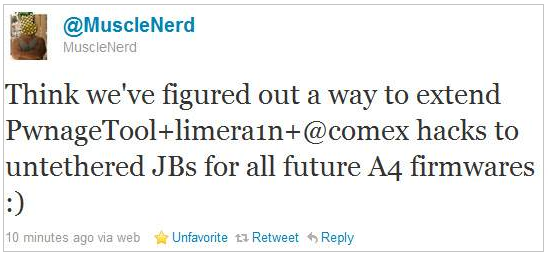
Good news for all A4 users (i.e. iPhone 4, iPod touch 4, iPad and Apple TV 2G users) as MuscleNerd has just surprised us by releasing a very important news. He mentioned that the Dev-team have figured out a combination between PwnageTool, limera1n and Comex untethered hacks, this combination will be able to make untethered jailbreaks for all above mentioned devices on all future firmwares.
You may also like:
Think we’ve figured out a way to extend PwnageTool+limera1n+@comex hacks to untethered JBs for all future A4 firmwares :)Thanks Dev-team for hard work and the guarantee of having untethered jailbreaks for life time. So that Apple will not be able to patch them if it did not upgrade its A4's hardware. We did not catch more news but we let you informed with all immediate updates, Stay tuned.
You may also like:
Subscribe to:
Posts (Atom)