If you are a Mac user (and have more than one computer) you will undoubtedly be familiar with Screen Sharing between machines. In a nutshell that is what Splashtop Remote Desktop does. Except in this case it is for connecting your PC to your iPad so you can use your iPad as a remote viewer and controller for your PC.
Showing posts with label iPad Apps. Show all posts
Showing posts with label iPad Apps. Show all posts
Friday, November 19, 2010

Thursday, November 18, 2010
HootSuite is Now Available for iPad
HootSuite for iPad is here! the online service to manage multiple social networks in one single place landed on the iPad with it's first app on the app store. HootSuite was already available for iPhone but it now comes to the iPad bringing all features, options and functionalities iPhone users have been able to enjoy for a year.
Wednesday, November 10, 2010
Yes ! Skyfire Web Browser for iPad Coming Soon
You read it right ! The company behind Skyfire has confirmed they are working on making their popular web browser available on the iPad soon.
This was confirmed on their Twitter account:

This was confirmed on their Twitter account:
We are working on an iPad version of Skyfire. If your primary device is the iPad, please consider waiting - Follow us for our iPad news!Skyfire web browser was released for iPhone couple of days back and was removed from the app store because it is SOLD OUT and it's now back and available for iPhone and iPod touch. I'm looking forward to get it on my iPad. Stay tuned as we'll inform you whenever it's available.
Saturday, November 6, 2010
How to Watch Free Live TV Shows on iPad, Right Now
You can get free and live broadcast on your iPad right now by using a new internet service called FilmOn. This service lets you watch HD quality television shows from channels from NBC, ABC, CBS, Fox, CNN and more from your iPad. Oh, the service also includes a channel for those people who like adult stuff.
It’s incredibly easy, and it don't require app, instead you can head on FilmOn.com via Safari browser from your iPad so you can browse all the channels provided by the service. Moreover, it allows you to pause the show, schedule i, and more things you can do with this service.
 The TV networks, of course, will work very hard to shoot down this service and they have already filed lawsuits against FilmOn. The founder Alki David believes he is legally operating within existing US copyright law and plans to spend heavily to win his legal battle with the networks. So FilmOn might survive ! [AllThingsD, via RedmondPie]
UPDATE 1: Yeah, we got some reports from our readers that it works on iPhone too then we tried it, yes it works !
It’s incredibly easy, and it don't require app, instead you can head on FilmOn.com via Safari browser from your iPad so you can browse all the channels provided by the service. Moreover, it allows you to pause the show, schedule i, and more things you can do with this service.
UPDATE 1: Yeah, we got some reports from our readers that it works on iPhone too then we tried it, yes it works !
Friday, November 5, 2010
iPad iOS 4.2 Game Center Apps Being Approved
Great news for iPad users and App developers, Apple has started approving Game Center compatible iPad applications just ahead of iOS 4.2 release. Even some of the iOS 4.2 apps are available for download like Big Bad Sudoku Book (iTunes Link) which has now full support for iOS 4.2 and also ready for multitasking too.

iOS 4.2 update that will bring multitasking, Game Center to iPad is expected to be released on November 7th. [via AppAdvice]
iOS 4.2 update that will bring multitasking, Game Center to iPad is expected to be released on November 7th. [via AppAdvice]
Thursday, November 4, 2010
CoBrowser Lets you Easily Share Your Browsing Experience with Other iOS Devices
Ever wished to share a webpage you’re viewing at your iPhone with your other iOS device? Yes, its possible now with the help of iOS application named CoBrowser.
CoBrowser is a collaborative browsing experience app for your iOS devices that lets you share your browsing experience with another iOS device. With this app you can easily show your friends what you are looking at.
 CoBrowser saves the webpage you are viewing on your iPhone and using bluetooth sends the stored images and text to a friends device. It works perfectly over both 3G and WiFi. As long as both devices have Bluetooth enabled and one of devices has connectivity to the internet it works perfectly without need to internet connection on the other device. The app is designed for both iPhone and iPad and costs $1.99. [via AppAdvice]
Download CoBroswer for iPhone and iPad [iTunes Link]
CoBrowser is a collaborative browsing experience app for your iOS devices that lets you share your browsing experience with another iOS device. With this app you can easily show your friends what you are looking at.
Download CoBroswer for iPhone and iPad [iTunes Link]
Phone Disk Turns your iPhone, iPad and iPod touch into a USB Drive [FREE]
Phone Desk is a nice tool for Windows and Mac OS X that enables you to turn your iPhone, iPod or iPad into a USB Drive.
By using standard USB cable, Phone Desk sits in menu bar or system tray of Mac or PC and whenever it finds an iOS device, it seamlessly mounts it to your files so you can directly access its files using Windows Explorer etc.

Key Features of Phone Desk

Macroplanet is giving free licenses of Phone Disk until 1st December 2010, so if you install and activate the Phone Desk before 1st December 2010, you will get free updates and can enjoy the full version of this software on your computer forever! So what are you waiting for? Head over to Phone Desk page to avail this offer before its too late.
By using standard USB cable, Phone Desk sits in menu bar or system tray of Mac or PC and whenever it finds an iOS device, it seamlessly mounts it to your files so you can directly access its files using Windows Explorer etc.
Key Features of Phone Desk
- Open, copy and save files directly on device
- Browse the iPhone in Finder and Windows Explorer
- Fully integrated with OSX and Windows
- Expands to work with multiple devices
- Clean application
- Copy images and the view them on device
Macroplanet is giving free licenses of Phone Disk until 1st December 2010, so if you install and activate the Phone Desk before 1st December 2010, you will get free updates and can enjoy the full version of this software on your computer forever! So what are you waiting for? Head over to Phone Desk page to avail this offer before its too late.
Wednesday, November 3, 2010
Apple is Removing Skyfire Web Browser from the App Store
It was just a couple of minutes when we reported about the release of Skyfire web browser for iPhone, iPad and iPod touch. The app works as a Flash player for iOS devices by converting Flash content into HTML5 and sending to your device to work as HTML5 content.
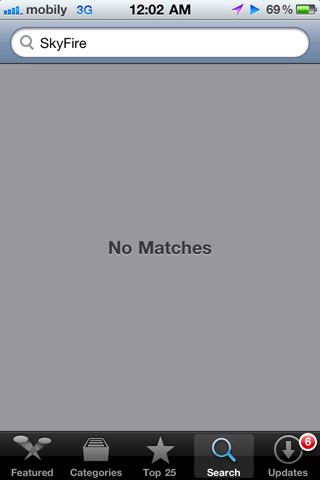 Unluckily, Apple started to remove the app for some reason we don't know! as the reports on Twitter form users live in other countries as Saudi Arabia, Sweden, Italy, and Greece can't get Skyfire web browser for iPhone as it's been removed. In case Apple remove Skyfire from all countries, it may get on Cydia for the same price or something cheaper. Stay tuned as we'll cover the news about that one!
UPDATE 1: According to some Twitter followers, Skyfire is no more available in Australia, Norway, Switzerland, Denmark, Germany, Portuguese, Spain, Norwegian.
UPDATE 2: Skyfire is not available in all countries world wide. Developers of Skyfire web browser explains what happened 'SOLD OUT':
UPDATE 1: According to some Twitter followers, Skyfire is no more available in Australia, Norway, Switzerland, Denmark, Germany, Portuguese, Spain, Norwegian.
UPDATE 2: Skyfire is not available in all countries world wide. Developers of Skyfire web browser explains what happened 'SOLD OUT':
Skyfire for iPhone has been received with unbelievable enthusiasm. Despite our best attempts and predictions, the demand far exceeds our initial projections.[Thanks everyone who sent this in]
The user experience was performing well for the first few hours, but as the surge continued, the peak load on our servers and bandwidth caused the video experience to degrade.
Thus we are effectively ‘sold out’ and will temporarily not accept new purchases from the App Store. We are working really hard to increase capacity and will be accepting new purchases from the App Store as soon as we can support it.
Skyfire for iPhone, iPad, iPod touch Hits the App Store
Yeah, the much waited native web browser for iPhone, iPad and iPod touch is now available for download to bring real Flash for iOS devices for $2.99. Skyfire browser was scheduled to be released on Thursday but it seems it has been released a day earlier than expected.

Download Skyfire Web Broser for iPhone, iPad, iPod touch [iTunes Link]
[Thanks Will for the tip via Twitter!]

FEATURES:
- Play millions of Flash videos – everyday, with no limits!
- All-new ‘Skybar’ toolbar gives one-click access to video and related content
- Be social: Share via Facebook and Twitter.
- Stay in touch: Unique Facebook ‘Quickview’ allows you to see your wall and feeds with one click.
- Standard browser elements: Tabs, search, sharing, bookmarks, history, etc.
- Video search, with safe search option helps you quickly find videos about your favorite topic
- ‘Desktop’ option loads pages as on a desktop browser, giving a greater selection of video (vs. mobile sites)
- Private Browsing option: Browse with no history and cookies left behind
- Click the ‘Explore’ button for related videos, news trends, photos and tweets!
Download Skyfire Web Broser for iPhone, iPad, iPod touch [iTunes Link]
[Thanks Will for the tip via Twitter!]
Saturday, October 30, 2010
VLC for iOS May be Pulled from the App Store
VLC, the popular meida player that's developed by French 3rd party studio Applidium, has landed on the iPad in September and then on the iPhone last week to play almost any video. But as noticed by iLounge, it may be pulled from the app store very soon for some reasons explained below.
 Apple has been sent a formal notification of copyright infringement regarding the way VLC for iOS is distributed in the App Store. Rémi Denis-Courmont, one of the primary developers of VLC, explained that Apple’s iTunes Terms and Conditions don't allow users to install both free and paid apps on more than 5 devices. This goes against the original GNU license VLC's code is based on.
In any case, while the rules for distribution of open-source or "free" (as in speech) software are extremely relaxed, they do exist and have to be abode by. VLC and open-source software in general would not have reached their current quality and success if it had not been for their license. Therefore, blatant license violation cannot be tolerated at any rate. Concerned users are advised to look for application on more open mobile platforms for the time being.So, in case you don't have the app already on your iPhone, better get it now as it still available here for free.
Thursday, October 28, 2010
Send and Receive SMS on iPad with SwirlySMS
SwirlySMS free is an SMS app for the iPad. This app allows you to send and receive native SMSes like on any normal cell phone. SwirlySMS free is only available for iPad 3G, as it will depend on the operator services. The app has a friendly interface and easy to use.
 As it a free app it does not burdened with the benefits, precisely it will allows you to send and receive SMSes only, it does not support sending MMS nor delivery notifications reports. SwirlySMS free is now available on Cydia via the BigBoss repo.
You may also like:

You may also like:
Wednesday, October 13, 2010
Osfoora for iPhone App Updated to Bring Numerous New Features
Said Marouf has just updated his popular Twitter client app for iPhone, “Osfoora”. Osfoora for iPhone 1.6 is now available in iTunes app store, it brings a bunch of new features as OAuth Echo compatibility and fixes several bugs. Here's the full changelog below.

Download Osfoora for iPhone, iPod touch and iPad [iTunes Link]
You may also like:
What's New in Version 1.6Osfoora for iPhone is available in iTunes app store and you can purchase it for $2.99. For previous members of Osfoora, you can get the update for free.
- Updated Image services to support OAuth Echo.
- Mobypicture Image and Video upload support.
- Twitgoo support.
- Fixed Posterous issues.
- Bug fix related to Blocking users.
- Fixed issue with yfrog video previews
- Improved scrolling.
- Slightly modified Icon.
Download Osfoora for iPhone, iPod touch and iPad [iTunes Link]
You may also like:
Tuesday, October 5, 2010
Play Xvid Movies on iPhone 4 and iPod Touch 4 with CineXPlayer
CineXPlayer app has been updated to be compatible with iPhone 4, 3GS, iPod touch 3rd and 4th generation running iOS 4.0 or later. CineXplayer app is the best way to enjoy your Xvid movies. Now you only have to transfer your Xvid movies to your iDevice and then play it directly without the need of any conversion.
 The previous version was for iPad only, thanks to the app developers, you can simply manage your videos with the app features such as full resume function, swipe to delete (to manage movies) and Rotate Lock. It is currently selling for $1.99

Download for iPhone, iPad and iPod Touch [iTunes Link]
You may also like:
Download for iPhone, iPad and iPod Touch [iTunes Link]
You may also like:
Monday, October 4, 2010
BitTorrent App for iPhone Hits the App Store [Updated]
Apple has officially approved the first application that makes it possible to manage the download of Torrent files directly to your iPhone, iPad and iPod touch. The new BitTorrent app called IS Drive. The app is intended as a tool for managing ImageShack’s torrent download service.
 BitTorrent is a peer-to-peer file sharing protocol that shares the bandwidth load for large file transfers between large pools of users. Apple has always blocked such apps for fear of allowing illegal activity that could undermine its iTunes business, this approval comes after Apple published a new set of guidelines, which provided an opportunity for many developers to take advantage of this (e.g. GV connect and GV Mobile+).
 The developer of the app is aware that the description has deliberately avoided mentioning the word "Torrent", describing the app as useful only to manage an account ImageShack Drive. IS Drive is currently selling for $4.99.
What do you think? If Apple realized that this app is a Torrent app, will Apple pull this app out the App Store?
Update 1: IS Drive has been removed from the App Store, see full details here.
Download for iPhone, iPad and iPod Touch [iTunes Link]
You may also like:
What do you think? If Apple realized that this app is a Torrent app, will Apple pull this app out the App Store?
Update 1: IS Drive has been removed from the App Store, see full details here.
You may also like:
Friday, October 1, 2010
MobileMe App Updated with iPad, Retina, and Multitasking Support
Apple today has pushed a major update to their MobileMe gallery app to bring full iPad support, Retina Display support for iPhone 4 and iPod touch 4, and also support for iOS 4 multitasking feature. For who don't know MobileMe app allows you to check on your MobileMe photo galleries using a beautiful user interface with a couple of neat features up its sleeve.

What's New In Version 1.2
Download MobileMe Gallery app [iTunes Link]
You may also like:
What's New In Version 1.2
- Universal app with full iPad supportThe app is free as always and can be downloaded from the link below:
- Supports fast app switching for iOS 4 devices
- Optimized for Retina displays
- View friends’ galleries without the need for a MobileMe subscription (iPhone and iPad only)
Download MobileMe Gallery app [iTunes Link]
You may also like:
Wednesday, September 29, 2010
Turn your iPod Touch into iPhone [Video]
We will show you today how to turn your iPod Touch into an iPhone with TextNow app, This is app is available in the App Store for free, TextNow app allows you to make phone calls, voice mail, call forwarding, text messages, picture messages and more. It works on your iPod Touch, iPad, and iPhone.
 TextNow app features:
Download It for iPhone, iPad and iPod Touch for free [iTunes Link]
[via tysiphonehelp]
You may also like:
- Get your own phone number to text with!
- THE ONLY TEXTING APP that lets you forward calls and receive voicemail with your phone number
- Send and receive FREE picture messages with your texting address!
- Fastest and most reliable texting app
- Set different ringtones for different contacts
- Personalize the app with different themes
- Customizable backgrounds
- Customizable ringtones
- Playful emoticons
Download It for iPhone, iPad and iPod Touch for free [iTunes Link]
[via tysiphonehelp]
You may also like:
Tuesday, September 28, 2010
Apple Updated Remote App for Apple TV
As we expect exactly, Apple has just updated their Remote app, which allows iOS devices to control iTunes and Apple TV using their iPhone, iPod touch, or iPad over your Wi-Fi network. From anywhere in your home change a song, pick a playlist or browse through your entire library. With a flick of your finger, you can even control every aspect of the Apple TV user interface.
 Features

The app hadn't been updated for nearly a year, but has finally received a 2.0 update that brings support for the iPad, Retina display and new Apple TV
What's New In Version 2.0
Download for iPhone, iPad and iPod Touch for free [iTunes Link]
You may also like:
- Control iTunes and Apple TV, from anywhere in your home
- Pause, rewind, fast forward, shuffle, and adjust the volume from your iPhone, iPod touch, or iPad
- View album, movie, and TV show artwork
- Create and update Genius playlists
- Create and edit playlists in iTunes
- Search your entire iTunes library
- Control iTunes to send music to AirPlay speakers
- Control the volume on each speaker independently
- Control Apple TV with simple finger gestures
- Enter text with the keyboard
- Even control Shared Libraries on iTunes and the new Apple TV
The app hadn't been updated for nearly a year, but has finally received a 2.0 update that brings support for the iPad, Retina display and new Apple TV
What's New In Version 2.0
- Designed for iPhone, iPod touch, and iPad
- Optimized for Retina displays and large screen real estate on iPad
- Support for Shared Libraries on iTunes and new Apple TV
Download for iPhone, iPad and iPod Touch for free [iTunes Link]
You may also like:
Sunday, September 26, 2010
HeyWire to Send Free International Text Messages with a Real Number
HeyWire is a new app available in the iTunes app store, this app was created by a company called MediaFriends to allow any user with an iPhone to send international text messages to people all over the world for free. The app can be used as chat or texting service that brings free messaging with a real phone number.
 The service enable users to text each other worldwide anywhere and supports 114 countries, 360 mobile operators, and major languages. The app can be downloaded for Mac or PC from here, for iPhone, iPod touch and iPad from the link below:
Download HeyWire Text Worldwide [iTunes link]
You may also link:
Download HeyWire Text Worldwide [iTunes link]
You may also link:
Monday, September 20, 2010
VLC Media Player for iPad Hits the App Store
The long overdue VLC Media Player is now available for free on the App Store, VLC Media Player one of the best media players for Mac and Windows. You have to enrich your iPad by downloading VLC on it now, VLC is a free and open source cross-platform multimedia player and framework, that plays most multimedias files and various streaming protocols.
 VLC app developers confirmed that the app will be compatible with the most video formats without conversion and any other iPad apps. another good news, they confirm that VLC app for iPhone is in progress and would see the light soon.
To transfer video files to iPad, you only have to connect the iPad to your computer, then open iTunes, and through the File Sharing feature, found under "Appllications", copy all the videos you want to transfer to your iPad.
Download VLC Media Player for iPad [iTunes Link]
You may also like:

To transfer video files to iPad, you only have to connect the iPad to your computer, then open iTunes, and through the File Sharing feature, found under "Appllications", copy all the videos you want to transfer to your iPad.
Download VLC Media Player for iPad [iTunes Link]
You may also like:
Sunday, September 19, 2010
You can Type uʍop ǝpısdn Using this App for iPhone
Flip / Bubble Text app for iPhone allows you to create awesome messages almost anywhere right from your iPhone, iPod Touch, or iPad. You can type uʍop ǝpısdn or in ⓑⓤⓑⓑⓛⓔ ⓛⓔⓣⓣⓔⓡⓢ, then easily copy the text to another app or post the text directly to Facebook and Twitter. Minutes ago, you may noticed that I posted a tweet showing the function of this app.
 Flip / Bubble Text app is available for free until the weekend, you can download it directly via iTunes, then check our iPhone apps gallery and iPad apps gallery for more apps in the App Store. [via iDB]
Download Flip / Bubble Text for iPhone, iPod touch and iPad [iTunes link]
You may also like:

Download Flip / Bubble Text for iPhone, iPod touch and iPad [iTunes link]
You may also like:
Subscribe to:
Posts (Atom)